
One board for the whole workshop
The agenda at the top, a row per topic, and columns for ideas, questions, decisions and actions. Participants add cards as you go, and when the session ends the decisions and actions are already written down.
Start a free 30-day trialNo credit card needed. See pricing
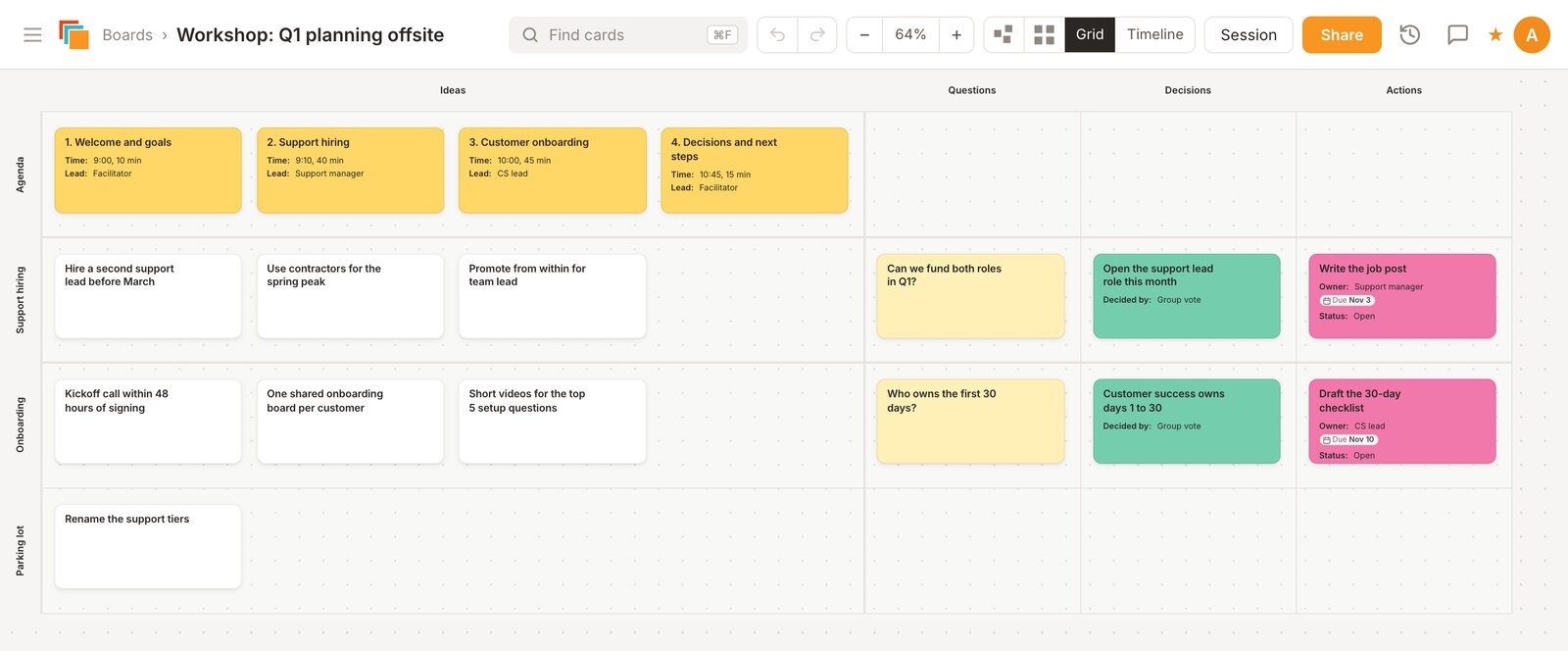
How the board is laid out
- Agenda row: one card per agenda item, with its timing.
- A row per topic, and a Parking lot row for good ideas that belong to another day.
- Columns: Ideas, Questions, Decisions and Actions. A topic is done when its Decisions and Actions cells are filled in.
Before, during and after
- Before: start from the Workshop template (Create From Template, then Team methods), rename the topics and add the agenda. Invite participants by email as collaborators. People who only need to follow along can open a view-only link without an account.
- During: one idea per card. Drag cards between cells as ideas turn into questions, decisions or actions, and use colors to flag what to come back to. Cardsmith runs in the browser next to Zoom, Teams or Meet, with nothing to install.
- After: export the board to PDF and send it round, and copy the action cards onto the team's project board.
If you run the same workshop often
Keep a master board and copy it for each session or client, with or without its cards. Folders keep each client's boards together. For open brainstorming, Cardsmith also has a freeform view where cards can go anywhere and connectors link related ideas.
Questions
- Do participants need an account?
To add or move cards, yes: you invite them by email and they sign in. To watch the board during the session, no: share a view-only link and anyone with it can open the board.
- Can I reuse my workshop design?
Yes. Copy the board with its layout only for a clean start, or with its cards to keep your prompts and examples.
- What does it cost?
Every account starts with a 30-day trial of all Professional features, and no credit card is needed. After that, Professional is $9 a month billed yearly ($12 billed monthly), and Team plans are $9 per person per month billed yearly. If you don't subscribe, your boards stay viewable but can't be edited. Details are on the pricing page.
Boards for other methods
Try it on your own plan
Start from the template, rename what you need, and invite your team.
Start a free 30-day trialNo credit card needed.