
A learning plan your whole team can see
Put every skill a new hire or a crew needs on one board: skill areas down the side, progress across the top, and a checklist on each card for the steps and the sign-off. Trainers, trainees and managers all look at the same plan.
Start a free 30-day trialNo credit card needed. See pricing
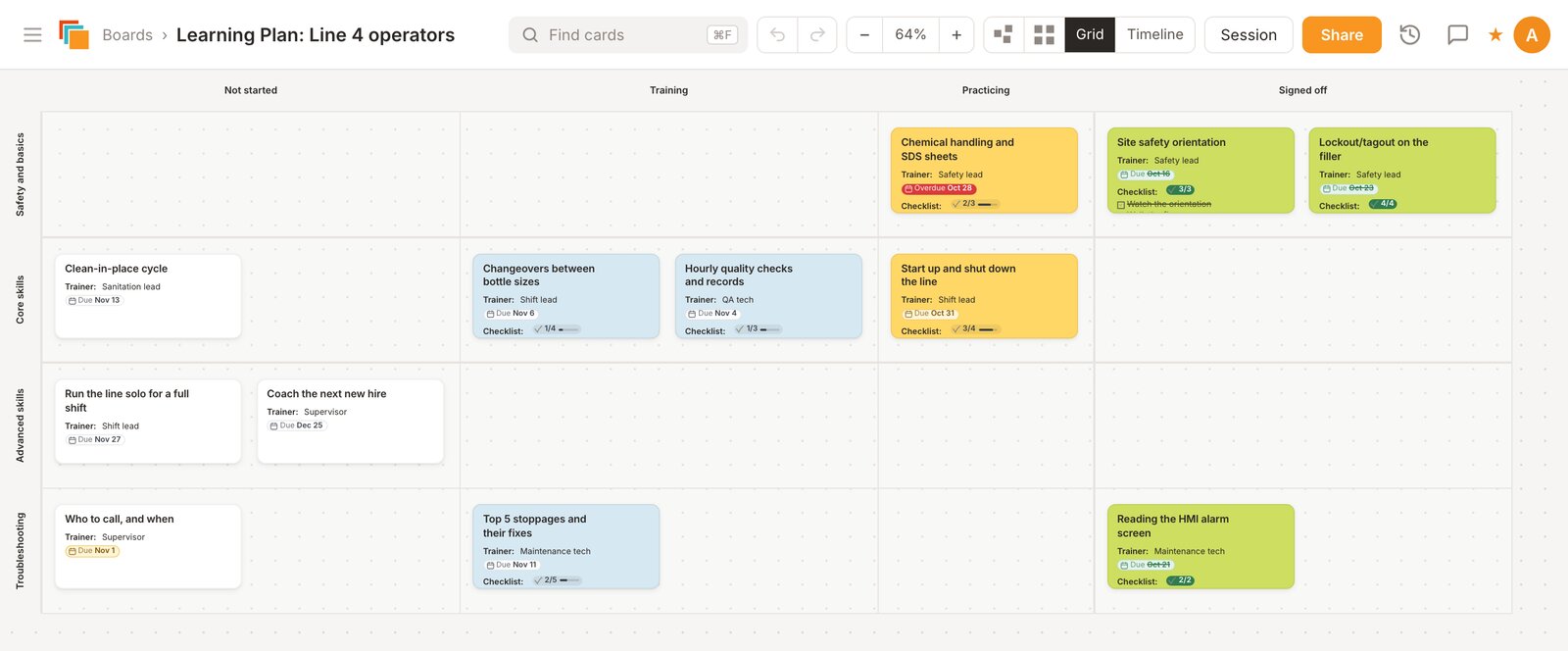
How the board is laid out
- Rows are skill areas. The template starts with Safety and basics, Core skills, Advanced skills and Troubleshooting. Rename them, add more, or hide the ones a role doesn't need.
- Columns are progress: Not started, Training, Practicing and Signed off. A card moves to the right as the person learns the skill.
- Each card is one skill. Its checklist holds the steps, who trains it and the sign-off, and the card face shows how many items are done (for example 2/3) without opening it.
Running training with it
- Build the plan once for a role. In Cardsmith, choose Create From Template and pick Learning Plan under Team methods. List the skills, add the steps to each card, and add a link to the SOP or video that already lives elsewhere.
- Copy it for each new hire. Cardsmith copies the layout and the cards, so everyone starts from the same plan.
- Share it. Invite the trainer and the trainee as collaborators, and give a manager view-only access.
- Move cards as skills are signed off. The activity log records who changed what and when.
- Keep a record. Export the finished plan to PDF or CSV for the training file.
Details that help
- Text, checklist, image and link fields on every card
- Card colors and icons for things like "safety-critical" or "needs a re-check"
- Grid totals: give cards a number field such as Hours and Cardsmith adds it up by column and row
- Comments with @mentions on each board
- Search across all your boards, and folders to group them by team or site
- Undo, and a Recently Deleted list if a board is removed by mistake
Questions
- Is this a learning management system?
No. Cardsmith doesn't host courses or quizzes. It holds the plan: what someone needs to learn, where they are, and who signed it off. Put a link on the card to the course, video or SOP that lives elsewhere.
- Can I track a whole crew on one board?
Yes. Put people down the side and skills across the top, or the other way around, and use card colors for status. Rows and columns can be added, renamed, reordered and hidden at any time.
- What does it cost?
Every account starts with a 30-day trial of all Professional features, and no credit card is needed. After that, Professional is $9 a month billed yearly ($12 billed monthly), and Team plans are $9 per person per month billed yearly. If you don't subscribe, your boards stay viewable but can't be edited. Details are on the pricing page.
Boards for other methods
Try it on your own plan
Start from the template, rename what you need, and invite your team.
Start a free 30-day trialNo credit card needed.